As the transition to the new TerraIndex Field is completed, licence checks in Field will soon be activated.
For most users, nothing will change in practice: Field automatically takes over the existing device licence, so you can continue working as usual.
In some situations, however, Field may ask you to make a choice when it starts. This article explains why, what to expect and what action to take.
For most users, nothing will change in practice: Field automatically takes over the existing device licence, so you can continue working as usual.
In some situations, however, Field may ask you to make a choice when it starts. This article explains why, what to expect and what action to take.
Why are licence checks being activated now?
During the transition from the old fieldwork app to the new TerraIndex Field, licence checks in the new app were not yet active. This kept the switch straightforward and allowed all users to try TerraIndex Field without immediately occupying a licence.
From Monday 13 July, the existing licensing model will be applied in the TerraIndex Field app. The licensing model therefore remains the same as in the old fieldwork app, as does the pricing model. What changes is that the use of device licences becomes clearer and easier to manage.
From Monday 13 July, the existing licensing model will be applied in the TerraIndex Field app. The licensing model therefore remains the same as in the old fieldwork app, as does the pricing model. What changes is that the use of device licences becomes clearer and easier to manage.
What will you notice as a user?
In most cases, nothing. If one existing device licence is linked to your account, TerraIndex Field takes it over automatically. You do not need to choose anything and can continue working straight away.
Field may only ask you to choose when several device licences or several licences are linked to your account. For example, you may have signed in on an old tablet and then started using a new device while the old device licence has not yet been released.
Taking over an existing device licence
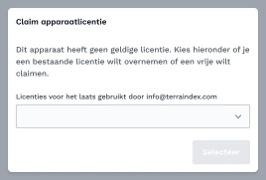
Does Field ask you to choose a device licence at startup? The dropdown shows which device licences are already in use.
You can identify a device licence by its device code and the time it was last synchronised, among other details. Is there an old licence that has not been used for a long time? It will often belong to an old device.
Access to multiple licences
Some users have access to multiple licences. This can occur in organisations comprising several companies, or when different companies collaborate within TerraIndex.
In that case, TerraIndex Field may ask you to choose a main licence. Select the licence of the company to which your use of Field should be assigned. You will retain access to the other licences linked to your device.
In that case, TerraIndex Field may ask you to choose a main licence. Select the licence of the company to which your use of Field should be assigned. You will retain access to the other licences linked to your device.
What if all device licences are in use?
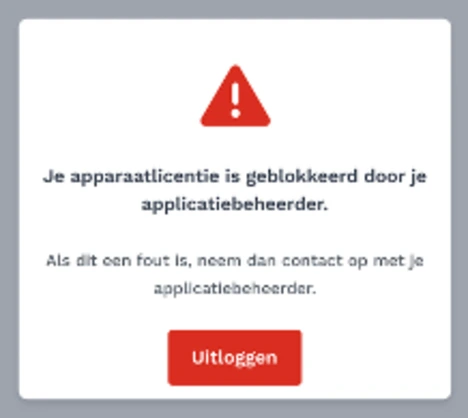
Do you see a message saying that all device licences are in use? All available device licences within that licence are occupied.
Old device licences may need to be released, or an additional licence may be needed. Contact your administrator first; they can check whether old device licences can be released.
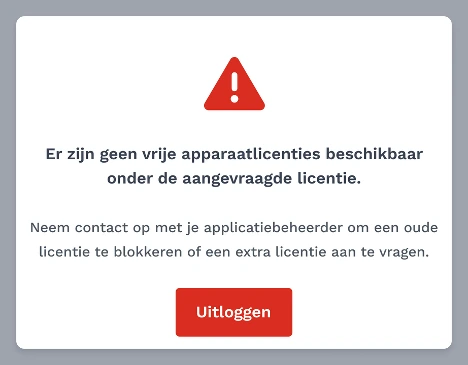
Old device licences may need to be released, or an additional licence may be needed. Contact your administrator first; they can check whether old device licences can be released.
Need additional Field licences?
Do you need an additional licence to continue using TerraIndex Field?
Contact our account manager Jeroen ten Kate. He will help you determine which extension suits your use.
Email: jeroen@terraindex.com
Telephone: +31 6 36162371
Contact our account manager Jeroen ten Kate. He will help you determine which extension suits your use.
Email: jeroen@terraindex.com
Telephone: +31 6 36162371