On this page you will find the improvements and new features of TerraIndex released in the first half of May.
Below you will first find the highlights of this release.
Scroll down for the full overview of all improvements and changes.
Highlights
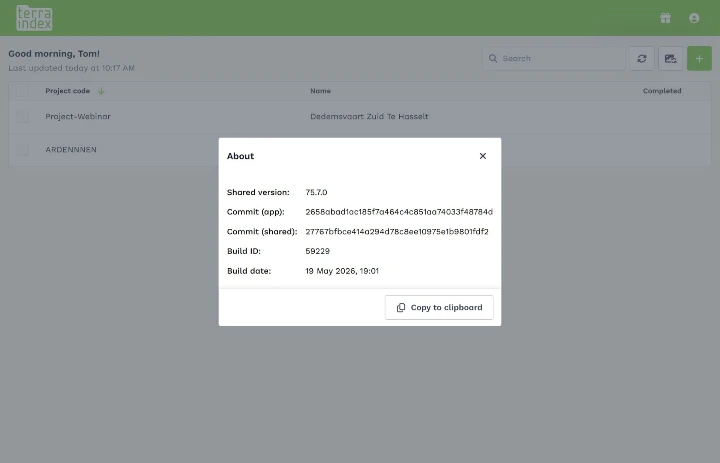
Environmental Field and Archeology: the version number is now displayed
This helps support assist you more effectively when you contact them. We can now more easily check whether the issue has already been resolved on your device.
Environmental Field: photos are now uploaded in batches
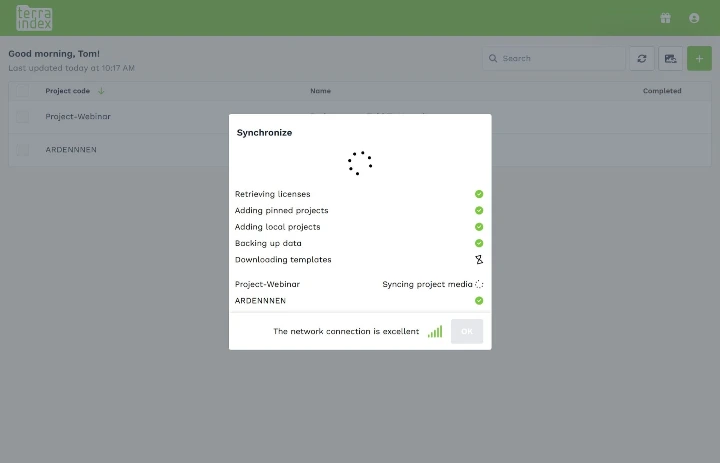
When synchronizing media files, photos are now uploaded in batches to prevent crashes on devices with limited memory and to improve performance.
Full overview
Newly added:
Environmental Field
- There is now a software version number available on the About page in the user menu.
- The backup steps are now more robust, and a raw backup is always sent if something goes wrong during the compile step.
- Photos are now uploaded in batches to prevent memory overload on certain Apple devices and to prevent crashes.
- Loading on the photo list page has been improved by only loading the photos that are actively visible on screen. This helps prevent memory overload.
Environmental Office
- After a lab assignment has been sent to SGS, the report number is automatically imported into TerraIndex.
- Extra mappings have been added for parameters in the Aquo CSV file import.
Archaeology Field & Office
- There is now a software version number available on the About page in the user menu.
- The field “Wind direction” is no longer shown on coupes, since it has no purpose on this entity.
- The field “Level” is no longer shown on raster units, since it has no purpose on this entity.
- There is a new field for trace features: “Fully examined”.
- There is a new field for trace features: “Registration Time”.
- Contact type is now visible in the involved companies list.
Bug fixes:
Environmental Field
- Illegal characters will no longer crash text inputs.
- Water samples were not always synced because they did not update the project correctly.
- Photos are now always saved correctly.
- Using a forward slash (/) will no longer cause an error during synchronization.
Archaeology Field & Office
- A find will copy over the fields once it has been split.
- The take-over button within trace features will once again take over all filled-in fields.
- One way of creating multiple relations within the same field has been fixed. However, we are aware that there are still other ways of creating multiple relations in the same field.
- Barcodes can now be copied with the take-over functionality.
Archaeology Office
- The print pop-up remembers the last filled-in company name and the last selected printer.
- Samples will no longer show strange codes in the type column in the find list.
- Users are no longer logged out when they are offline.